
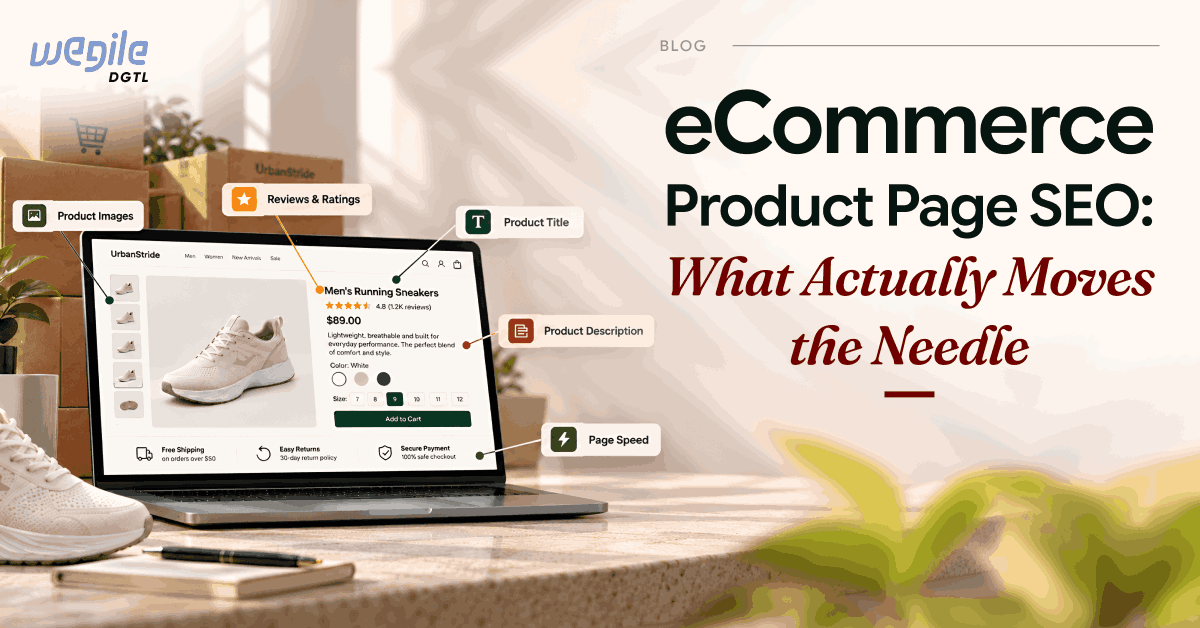
Most eCommerce product page SEO advice reads like the same checklist copied from site to site: add alt text, write unique descriptions, add schema. Following that checklist is a fine starting point. It just won’t tell you why one product page outranks another, or why one converts and the other doesn’t.
Baymard Institute’s product page benchmark, which scores 344 leading US and European eCommerce sites against its product page UX guidelines, found that 51% of sites have a “mediocre” or worse product page implementation, with only 49% rated “decent” or “good.” Large, well-funded retailers show up in that mediocre-or-worse group too, so this isn’t just a problem for small or under-resourced sites. That gap between “has an SEO checklist” and “actually executes it well” is where this guide spends its time.
eCommerce Product Page SEO: The Fundamentals
Start with keyword mapping. Every product page should target one primary keyword, usually the product name plus a distinguishing detail like brand, size, or material, with long-tail variations layered in naturally through the description and specifications. Mapping one keyword to one URL also avoids cannibalization, where two pages on your own site compete against each other for the same search instead of one page ranking clearly.
Titles and meta descriptions need the primary keyword near the start, since that’s what shows up bolded in search results and earns the click. Keep titles under 60 characters and descriptions under 160. Templated meta descriptions that just swap in the product name read as generic to both shoppers and search engines.
The description itself is where most stores do the worst job. Pasting the manufacturer’s copy onto your page means you’re competing against every other retailer selling the same product with identical text, and Google has no reason to rank any one of you above the rest. Baymard’s product page benchmark consistently flags unstructured, single-paragraph descriptions (no broken-out specifications or highlights to scan) as one of the most common failures it finds. Write your own copy, organized around what the product actually does for the buyer, and structure it so someone skimming on their phone can find the one specification they came for.
URLs and internal linking are the last of the fundamentals, and they’re easy to get wrong without noticing. A product URL should be short, readable, and include the keyword, not a string of category IDs and parameters. Beyond the URL itself, every product page needs a clear path back to its category through breadcrumbs, plus internal links to related or complementary products. This does two things at once: it helps shoppers keep browsing instead of bouncing, and it gives Google a clearer picture of how your catalog is organized, which helps newer or lower-traffic product pages inherit some authority from the pages already linking to them.
Structured Data and Images That Actually Help
Google’s own documentation on product structured data describes two kinds of markup: product snippets, for pages where someone can’t buy directly, and merchant listings, for pages where they can. Merchant listings support more detail, including price, availability, and return policy, and Google explicitly recommends pairing on-page structured data with a Merchant Center feed to maximize eligibility for rich results.
In practice, this means every product page needs Product schema with accurate price, availability, and GTIN (the standardized barcode number that uniquely identifies the product) that matches what’s actually on the page, not what it looked like when the page was built six months ago. Stale structured data (a price that’s gone up, an item marked in stock that isn’t) gets flagged and can cost you the rich result entirely. Getting this right is core technical SEO work.
Images matter, but not for the reason most checklists focus on. A descriptive file name (like red-cotton-tshirt-large.jpg instead of IMG_1234.jpg) and alt text help, but they’re not the real issue. The real issue is that most product pages never pair their images with a clear specification table. A photo can’t show the exact material, dimensions, or compatibility, so that information needs to be written out somewhere obvious. Baymard’s benchmark lists incomplete or missing specification sheets as one of the most common problems it finds across the sites it tests.
How AI Shopping Search Is Changing Product Page SEO in 2026
This is the part most product page SEO guides skip entirely, and it’s becoming the part that matters most.
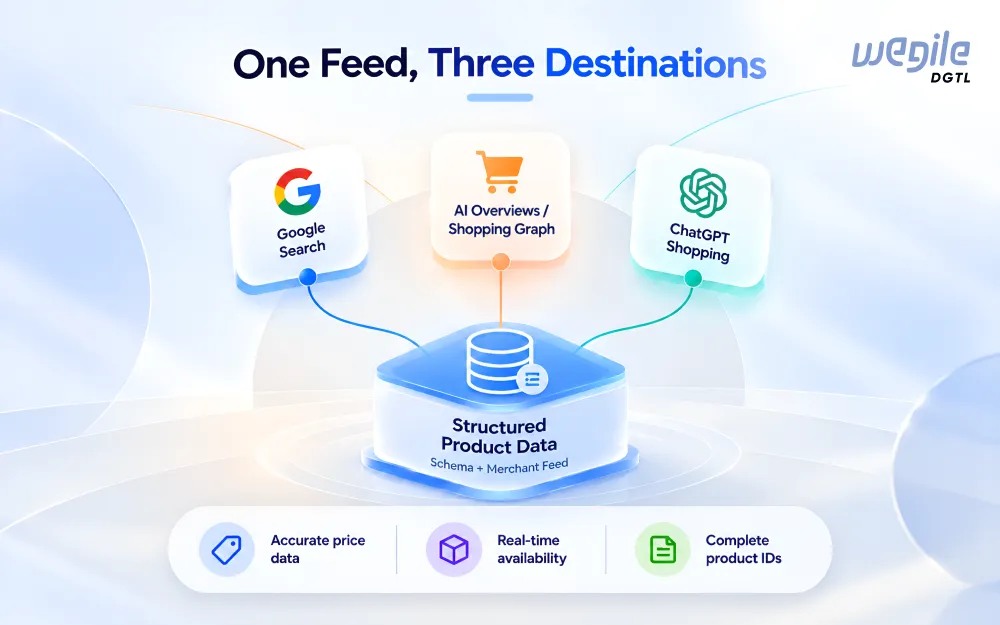
Google’s AI Overviews pull product recommendations from the Shopping Graph, which is built from Merchant Center feeds, the same Schema.org Product markup covered above, and customer reviews. A product page with clean, accurate structured data isn’t just eligible for a rich snippet anymore. It’s also more likely to be the data Google’s AI actually cites when answering a shopping-related query directly in the results.
The same pattern is showing up outside Google. OpenAI’s own commerce documentation describes how ChatGPT’s shopping features work: a merchant shares a regularly refreshed product feed containing identifiers, descriptions, pricing, inventory, media, and fulfillment details, and ChatGPT uses that feed to recommend and, for approved merchants, check out products inside the chat itself. The required fields are almost identical to what you’d already need for clean Merchant Center data and solid Product schema.
The practical takeaway: the structured data work covered in the last section isn’t just an SEO task anymore. It’s the same foundation that AI shopping tools across Google, ChatGPT, and similar assistants actually read from. Get it right once, with accurate pricing, availability, and product identifiers, and that work covers both instead of being a separate project later.
Reviews, FAQs, and Trust Signals
Reviews function as both a trust signal for buyers and a content signal for search engines, since they add unique, frequently updated text that no competitor can copy. Review schema markup lets that star rating show up directly in search results, which earns clicks even from a lower position.
Most stores add a reviews widget near the bottom of the product page, below the description and buy button, and stop there, missing two specific problems Baymard’s benchmark flags as recurring weak points. The first is showing only an average star rating instead of the full breakdown. A shopper can’t tell whether a 4.2 average comes from mostly 5-star reviews with a few bad ones mixed in, or from a long list of consistent 4-star reviews, unless the full breakdown is shown. The second is a weak or missing FAQ section, either skipped entirely or filled with generic questions that don’t address the real objections a buyer has before purchasing.
A real FAQ section is still worth having. It answers the specific questions that come up in your support tickets and reviews instead of a generic template, and that same content is what AI answer engines read directly, even though Google retired the FAQ rich result from Search in May 2026.
Fixing Variant Pages Without Hurting Your Own Rankings
Products with multiple colors, sizes, or configurations create a real SEO risk: near-identical pages competing against each other instead of one clear page ranking well. Use a canonical tag pointing every variant back to the primary product page, or add a noindex tag (telling Google not to index that page at all) to low-value variant pages, so Google consolidates ranking signals onto one URL instead of splitting them across five nearly identical ones.
Out-of-stock and discontinued products need different handling, and this is where a lot of stores make a costly mistake. A temporarily out-of-stock product page should stay live and indexed. Deleting it means losing every bit of ranking history the page built up, and rebuilding that from zero when the item comes back is far harder than keeping the page up with clear “back in stock soon” messaging in the meantime. A permanently discontinued product is different: 301 redirect it to the closest replacement product, or to the relevant category page if no real replacement exists, so the page’s existing authority transfers instead of dead-ending in a 404.
Which Product Pages to Fix First
Every guide so far, including this one, assumes you have time to apply all of this across your whole catalog. Most stores don’t. A store with 2,000 SKUs can’t rewrite 2,000 descriptions this quarter, so the real skill is picking the right 50 to start with.
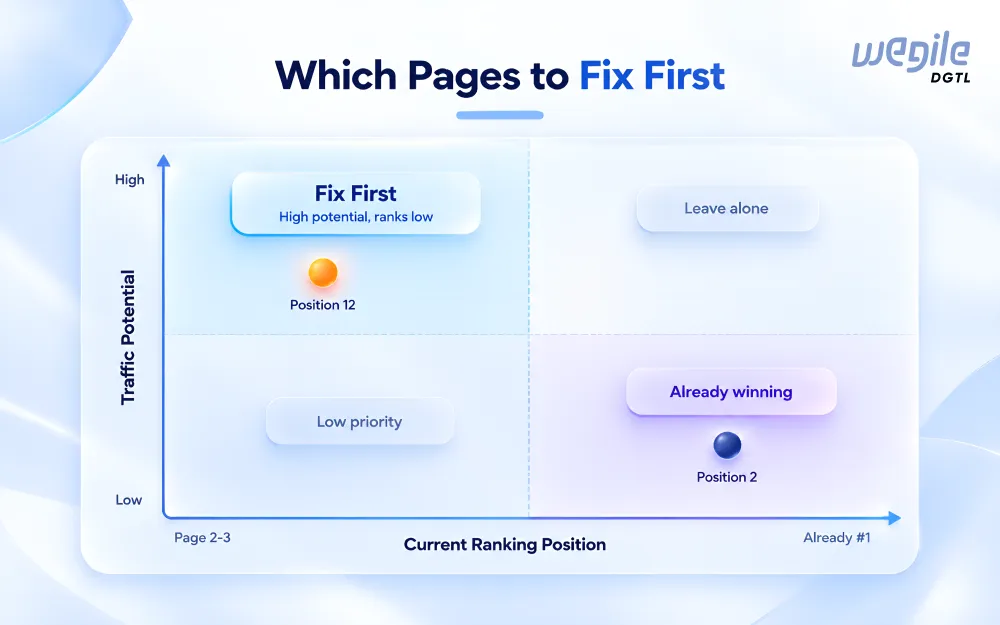
Start by pulling two numbers for every product page: organic sessions and revenue over the last 90 days. Then rank the pages by their upside, how much more traffic and revenue a page could realistically gain.
Here’s what that looks like in practice. Say one product page ranks at position 12 for a keyword that gets 2,000 searches a month, and another page already ranks at position 2 for a keyword that only gets 200 searches a month. The second page technically ranks better, but it has far less room to grow.
Moving that second page from position 2 to position 1 might add a handful of extra visits. Moving the first page from position 12 up to position 5 could add hundreds of new visits a month, since it’s starting from a much bigger pool of searches and a much lower position.
That’s the real test for picking which pages to fix first: how much traffic a page could realistically gain. Sort your list that way, and the first month of fixes will actually show up in your traffic numbers. Our eCommerce SEO team builds this kind of prioritized list before touching a single page, specifically so the first month of work targets pages that can actually move revenue, not just the ones that happened to be built most recently.
Page Speed and Mobile, the Non-Negotiables
None of the above matters if the page takes too long to load or breaks on a phone. Most product page traffic is mobile now, and a slow-loading page loses visitors before they ever read the description you just rewrote. Compress product images without visibly degrading quality, set images further down the page to load only once someone scrolls to them, and test the actual mobile layout yourself rather than trusting that a responsive theme handles it automatically. This isn’t a one-time fix either. A new app, a tracking script, or an unoptimized image upload can quietly undo months of speed work, so check it again after any site change, not just during the original audit.
Frequently Asked Questions
How long should a product description be?
Long enough to answer the real questions a buyer has before purchasing, structured so the key specifications are easy for a shopper to skim rather than buried in one paragraph. There's no fixed word count that works for every product category.
Do I need schema markup on every product page?
Yes, at minimum Product schema with accurate price and availability. Add review schema wherever you have real reviews. FAQ schema is different: Google retired the FAQ rich result from Search in May 2026, so it no longer earns a rich snippet there, though a genuine FAQ section is still worth having for buyers and for AI answer engines that read it directly.
Should I delete product pages for items that are out of stock?
Not if the item is coming back. Keep the page live and indexed, and only use a 301 redirect once a product is permanently discontinued.
Does fixing structured data actually help with AI shopping results, or just traditional search?
Both. The same accurate Product schema and Merchant Center feed data that earns rich results in traditional search is also what systems like Google's Shopping Graph and ChatGPT's shopping feature read from directly.
Final Thoughts
If there’s one thing to take from this guide, it’s this: the checklist items themselves (schema, alt text, unique descriptions, reviews) matter less than which pages you apply them to first and whether the underlying data is actually accurate. A perfectly written description on a page nobody searches for won’t move revenue. A messy page with real traffic potential, fixed properly, will.
Structured data matters more going into 2026 specifically because it now feeds AI shopping tools as well as traditional search results, so getting it accurate once covers more ground than it used to. Start with the pages that already get traffic, fix the data errors before the copy, and work outward from there. For a look at how this plays out across a full catalog, our eCommerce industry page walks through the broader strategy we build for online retailers.
Want a prioritized fix list for your own catalog?
See Wegile DGTL eCommerce SEO