
Clients ask me this before they’ve spent a single dollar on ads: should they start with Google or Facebook? There’s no universal right answer, no matter what most agencies will tell you. The right starting platform depends on what you’re selling, how your customers actually shop for it, and how much budget you can commit to a real test in the first month.
This is how I’d actually walk a client through the decision: what each platform does differently, what they really cost, and a mechanism almost nobody explains, one that can quietly decide whether your first budget gets a fair chance to work.
Google Ads vs Facebook Ads: What Each Platform Actually Does
Google Ads and Facebook Ads (run through Meta Ads Manager, which also covers Instagram) solve two different problems, and that difference matters more than any feature comparison.
Google Ads reaches people who are already searching for exactly what you offer. Someone types “emergency plumber near me” or “best CRM for small teams” into Google, and your ad shows up right when they’re ready to act. You’re capturing demand that already exists.
Facebook Ads work the other way. Nobody searches for your product on Facebook. Instead, Meta’s targeting puts your ad in front of people who fit a profile, based on their interests, behavior, and who they’re similar to. You’re not capturing demand, you’re creating it by putting your offer somewhere a good-fit buyer will actually see it.
Neither approach is better by default; it depends on the buyer. Someone with a burst pipe in the middle of the night already knows exactly what they need, which makes them a Google buyer. A homeowner who has never thought about outdoor lighting is a different case: they’re not searching for it yet, but they might want it once they see what the lighting actually looks like, which makes them a Facebook buyer. Someone deciding to buy landscape lighting after seeing an ad for it still thinks it over like any real purchase; they don’t buy it on the spot. Facebook’s only real advantage here is timing: it can put the idea in front of someone before they’d ever think to search for it themselves. So the real question for your own business is this: does your customer already know they want what you sell, or do they need to be shown it first?
Ad Formats and Targeting Depth
Google Ads mostly show up as text: a headline, description, and a link, matched to the exact words someone typed. Shopping ads add a product photo and price for retail searches, and Performance Max lets Google’s algorithm place your ad across Search, YouTube, Gmail, and Display automatically, using whatever format performs best for each placement. None of it depends on a flashy creative, it depends on matching the right offer to the right search term.
Facebook Ads are built around the opposite strength: visuals. Single images, videos, carousels of multiple products, and Reels-style short videos, all run through the same Ads Manager. Creative quality has a direct effect on performance here, since the ad has to earn attention while someone is scrolling, rather than answer a question they already typed.
Targeting works just as differently. Google’s targeting starts with keywords, and audience signals like in-market audiences, remarketing lists, and demographics are layered on only as a refinement, not the main targeting method. Meta’s targeting starts with the audience itself: interests, behaviors, lookalike audiences built from your existing customers, and custom audiences built from your own website or customer list data. Meta’s Advantage+ automated campaigns now handle a lot of that targeting work automatically, but the underlying logic is still audience-first, while Google’s logic remains search-first.
Cost Comparison: What You’ll Actually Pay
Most comparison articles oversimplify this part. They quote a single “average CPC” for each platform as if every business in every industry pays the same amount, and that’s not true.
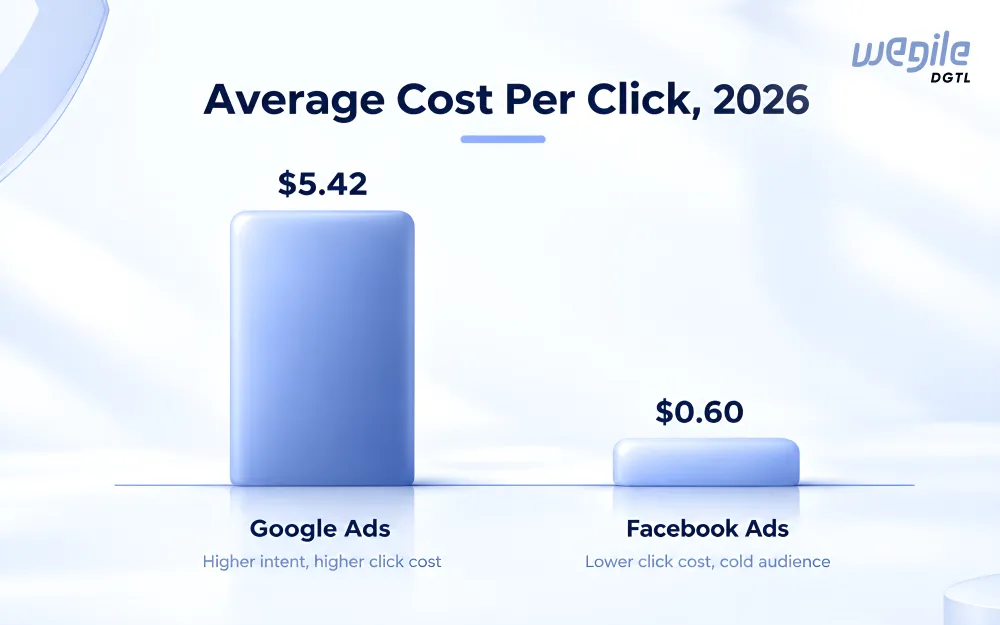
WordStream’s 2026 benchmark report puts Google’s average CPC across all industries at $5.42, with wide swings underneath that average (legal services runs close to $9.87 per click, while arts and entertainment sits closer to $1.63). Meta’s 2026 benchmarks, also citing WordStream data, put the average CPC on traffic campaigns at $0.60, with lead-generation campaigns running higher depending on industry.
That gap looks like it settles the question in Meta’s favor, but it doesn’t, since cheaper clicks aren’t the same as cheaper customers. Google Search traffic converts at a noticeably higher rate (commonly cited around 4%) than Meta’s cold, interest-based traffic (closer to 1-2%), since Google is showing your ad to someone already in buying mode. A $5 click that converts at 4% can end up cheaper per customer than a $1 click that converts at 1%.
This is also where your own numbers matter more than any industry benchmark. At Wegile DGTL, our base paid ad spend for clients starting out runs $1,500 a month on our Foundation and Momentum plans, and $2,000 on Advanced, on top of management. That range isn’t picked at random. It’s close to what it actually takes to approach the learning-phase threshold on one platform, which is why it holds up as a genuine starting figure rather than a guess, and that threshold is exactly the part most comparisons skip entirely.
The Learning Phase
Every major ad platform runs on machine learning now. Before that machine learning can do its job, it needs enough real results to learn from. Marketers call this the learning phase, and it applies to both Google Ads and Facebook Ads, just on slightly different terms.
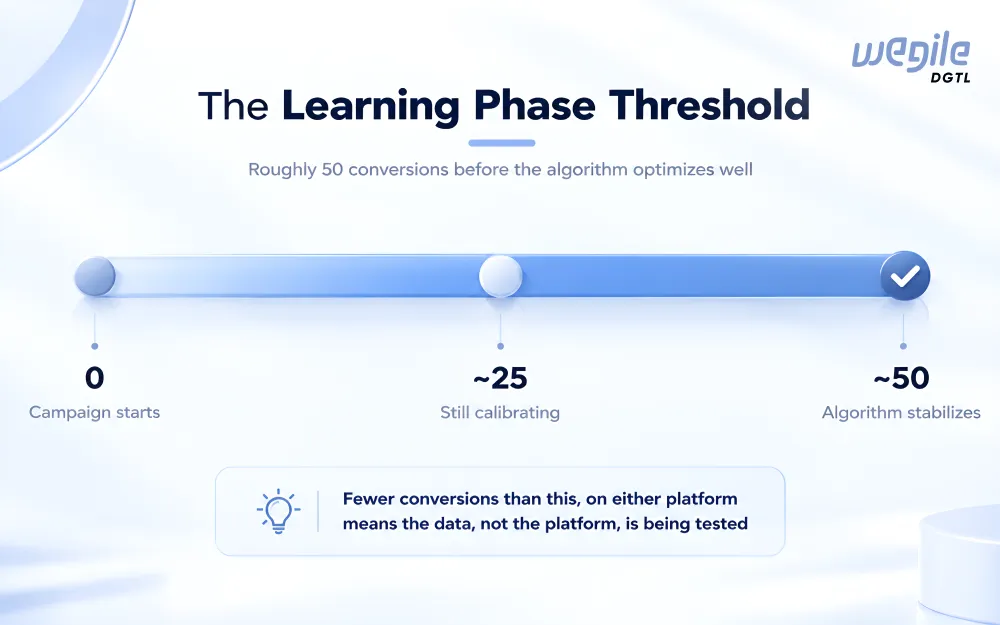
According to Meta’s own Business Help Center, an ad set generally needs around 50 conversion events within a rolling 7-day window before it exits the learning phase and starts running efficiently. Fall short of that, and Ads Manager will flag the ad set as “Learning Limited,” meaning it never gets enough signal to stabilize. Major edits, like changing the budget, audience, or optimization goal, reset the clock and start the learning phase over.
Google Ads work on a similar principle but measures it differently. According to Google’s own guidance, its learning period depends mainly on your conversion volume, how long it takes a click to turn into a conversion, and which bid strategy you’re using, and it typically takes one to two conversion cycles to calibrate. Manual bidding has no learning period at all, since there’s no algorithm adjusting bids on its own. Google doesn’t publish one fixed conversion number the way the 50-per-week figure is commonly cited for Meta, but the underlying logic is the same: more real conversions, faster and more reliable calibration.
The practical takeaway: if your budget can’t realistically produce that many conversions in the test window, on either platform, you’re not testing the platform itself. You’re testing whether the algorithm ever got enough data to work with. A $500 test budget in a $150-cost-per-lead industry won’t tell you much about Facebook or Google. It’ll just tell you that $500 wasn’t enough conversions for either one to learn from.
Which Is Better for Small Businesses?
“Which is better” is the wrong question on its own. The better question is which platform fits your specific business right now, and where that customer sits in their own buying journey.
Marketers often describe this as a funnel stage. Someone at the top of the funnel doesn’t know they have a problem yet, or hasn’t connected it to your solution. Someone at the bottom is actively comparing options and ready to buy. Facebook tends to do more of the top-of-funnel work, introducing your business to people before they’re searching. Google tends to do more of the bottom-of-funnel work, catching people once they’re already comparing. Most businesses need both stages covered eventually, just not always from day one.
Local service businesses (plumbers, electricians, HVAC, landscape lighting) usually do better starting with Google Ads, because the person searching “landscape lighting installer near me” already has a problem and a budget. Facebook can still work well for these businesses, especially to build awareness in a market before someone starts searching, but it asks for more patience before it pays off.
Ecommerce brands with a visually strong product, something people decide on by seeing it, tend to get more from starting on Facebook or Instagram, since the format is built for scroll-and-discover shopping. Google Shopping ads are worth testing too, for the segment of buyers who already know what they want and are comparing prices.
B2B and higher-ticket services often lean towards Google first, since the buying intent (and the keyword cost that comes with it) reflects a real, researched purchase decision, while Facebook’s broader targeting can struggle to isolate a narrow B2B buyer efficiently.
None of these are fixed rules. They’re starting points based on where buyer intent naturally sits for each business type. Our paid ads management team builds the actual platform mix around your specific numbers rather than a generic category.
When to Use Each One
A simple way to decide for your own business:
- Choose Google Ads first if your customers already search for what you sell, your sales cycle is short enough to need an answer now, and you can name the exact keyword someone would type.
- Choose Facebook Ads first if your product needs to be seen to be wanted, your audience is easier to describe by interest or demographic than by search term, and you have some patience for a slower first few weeks.
- Choose both from day one if your monthly budget comfortably clears the learning-phase threshold on each platform separately, not just combined. Splitting a thin budget across two platforms usually means neither one ever gets enough data to work.
- Choose neither yet, and fix your website or offer first, if your current conversion rate is so low that no amount of extra traffic would turn into real customers.
Before you decide, it’s worth checking what your competitors are already running. The Meta Ad Library and Google Ads Transparency Center are both free and need no login, and they show you exactly which platform your competitors are already betting their budget on. If most of them show up in one place and not the other, that’s a real signal about where your audience already is.
Can You Run Both at the Same Time?
Once a budget is large enough to clear the learning-phase threshold on each platform on its own, running both together usually beats picking one. Google captures the people already looking. Facebook builds awareness with the people who aren’t searching yet, so that by the time they are, your name is already familiar.
In practice, that usually means a heavier share of the budget on Google once a customer is actively comparing providers, and a lighter, consistent Facebook presence running in the background to stay visible before that comparison starts.
This is also where the competitor check from the last section becomes useful. If most of your competitors show up in the Google Ads Transparency Center and barely at all in the Meta Ad Library, that’s a sign your buyers are already searching before they ever compare providers, the exact situation where Google captures the people already looking and earns the bigger share of the budget.
The exact split still depends on your cost per lead on each platform and how long your sales cycle runs, which is exactly the kind of number our team checks before recommending a split for a specific account rather than a generic percentage.
Frequently Asked Questions
Is Google Ads or Facebook Ads cheaper?
Facebook's average cost per click usually comes in lower than Google's, but Google's traffic tends to convert at a higher rate because the person is already searching. Compare cost per customer, not just cost per click, before calling one cheaper.
Can I run Google Ads and Facebook Ads with a small budget?
You can, but splitting a small budget across both often means neither one collects enough conversions to exit its learning phase. A single, focused platform usually outperforms two underfunded ones.
Which platform is better for a brand-new business with no past data?
Start with whichever platform matches how your customer actually buys, as covered above, rather than the one with cheaper clicks. A new business with no conversion history should expect a few weeks of learning-phase data collection on either platform before judging results.
Do I need separate creative for Google and Facebook?
Yes. Google Ads is built around matching text to a search term, while Facebook Ads depend on a visual that holds someone's attention while they scroll. Reusing the same creative across both usually underperforms compared to creative built for the platform.
Final Thoughts
If there’s one thing to take from this guide, it’s this: the Google Ads vs Facebook Ads decision isn’t about which platform is objectively better. It’s about matching the platform to how your specific customer actually buys, then giving whichever one you pick enough budget to clear its own learning phase, roughly 50 conversions in the relevant window.
If your industry’s cost per lead is high enough that 50 conversions isn’t realistic on your starting budget, that’s not a sign you picked the wrong platform. It just means the honest first goal is a smaller, focused test rather than a full exit from the learning phase, and that’s a fine place to start. For more on sizing that first budget correctly, our first ad budget guide walks through the numbers in more depth.
Want a team to build the platform mix around your numbers?
See Wegile DGTL paid ads management